
The Lounge is where members talk between classes. It is open to every membership, from the Lounge membership up.
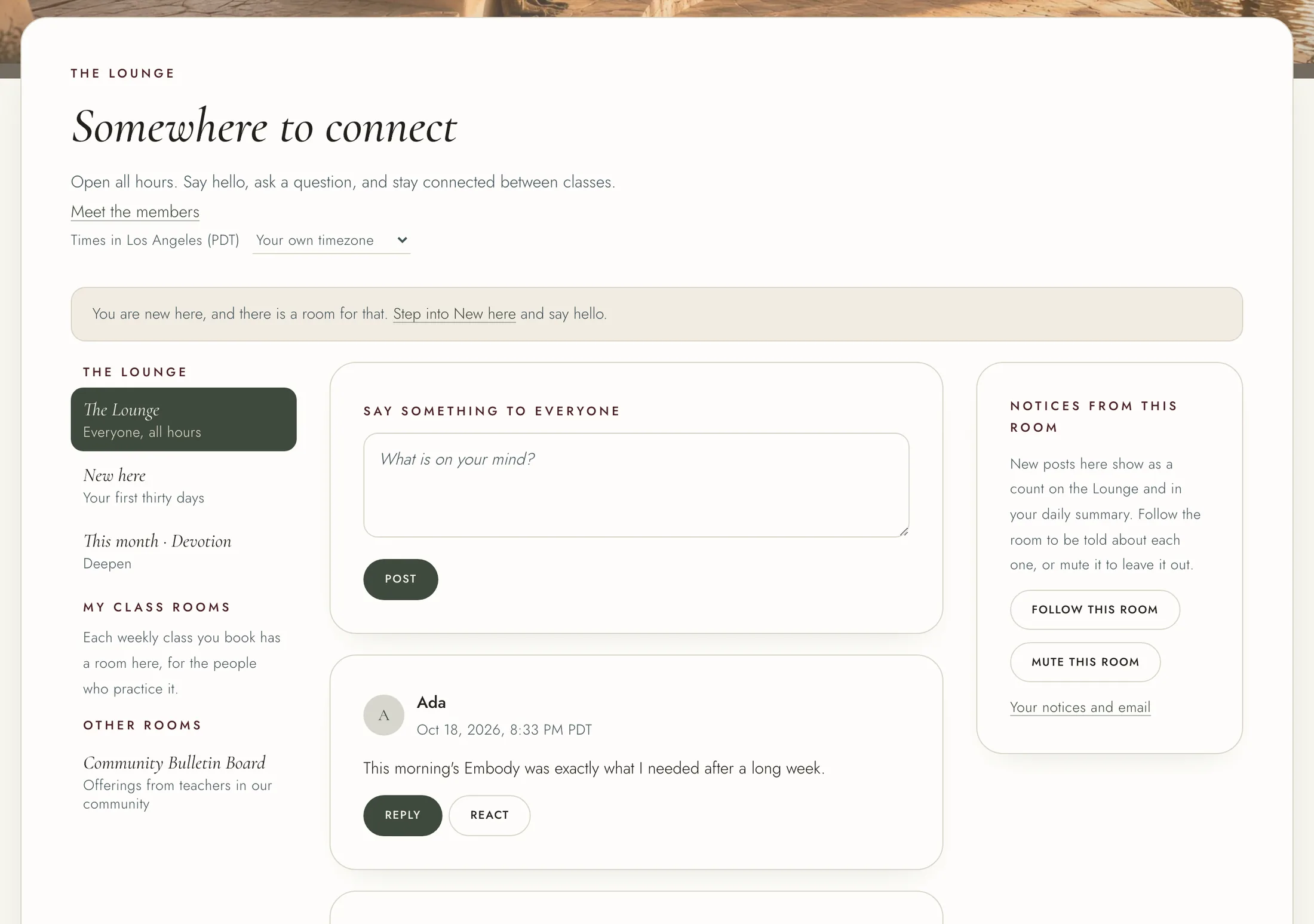
The rooms are listed down the side, or behind the "Rooms" button on a phone. The Lounge is for everyone. New here is for members in their first thirty days. Under "My class rooms", each weekly class you book has a room for the people who practice it and its teacher. Some other rooms are for a particular membership, and say who posts there.
To post, write in the box at the top of a room and press "Post". To reply, press "Reply" on a post, write your reply and press "Reply" again. To react, press "React" and choose one.
If a post or reply troubles you, press the "..." beside it, then "Report". Say what is wrong if you like, and press "Send to the team". It stays between you and the team. On a post, the same menu has "Message", to write to its writer.
The member directory lists the people in the Lounge. Open "Member directory" from the menu under your name, or "Meet the members" at the top of the Lounge. Find somebody by name, or by where they are if they show it. To leave the directory, press "Take me off the directory" under "My listing".
New posts show as a count in the Lounge. By email, you get one summary a day. To change that, open "Profile and settings", the Notices tab, and choose under The Lounge: an email for each one, one a day, or no email. You can also turn on "Every new post", or press "Follow this room" or "Mute this room" in any room.