
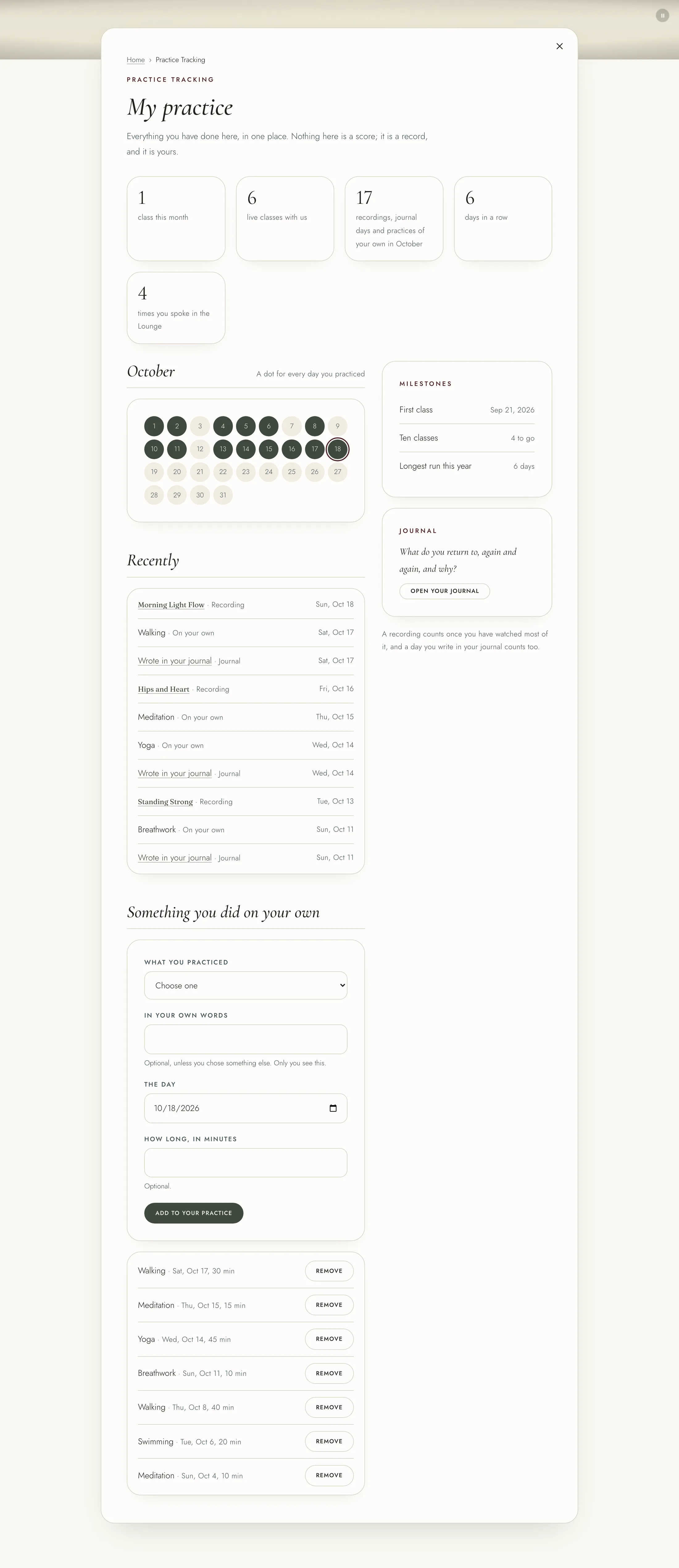
Your practice is a record of what you have done here, kept for you alone. Open "Practice Tracking" from the menu under your name. The page is called "My practice".
These count as a practice:
1. A live class you booked, once it has started, unless it was called off. 2. A recording you watch most of the way through, once a day for each recording. 3. A day you write in your journal. 4. Something you did on your own and add yourself.
The page shows your classes with us, what else you did this month, your days in a row, and a dot for every day you practiced this month. "Recently" lists what you have done.
To add something you did away from here, go to "Something you did on your own":
1. Choose what you practiced, such as breathwork, meditation, yoga or walking. 2. Add it in your own words if you like. Only you see this. 3. Choose the day, and how long if you like. 4. Press "Add to your practice".
To take one away, press "Remove" beside it.
Your journal is private. Nobody at The Refuge can read it, the team included. Open "Journal" from the same menu. Each month's theme comes with a prompt at the top. Write in the box and press "Save the entry". Leave "Writing to this month's prompt" ticked if you are answering it.
Your entries are under "What you have written". Open "Change it" to edit one, or "Delete it" to remove it for good. A deleted entry cannot be brought back.